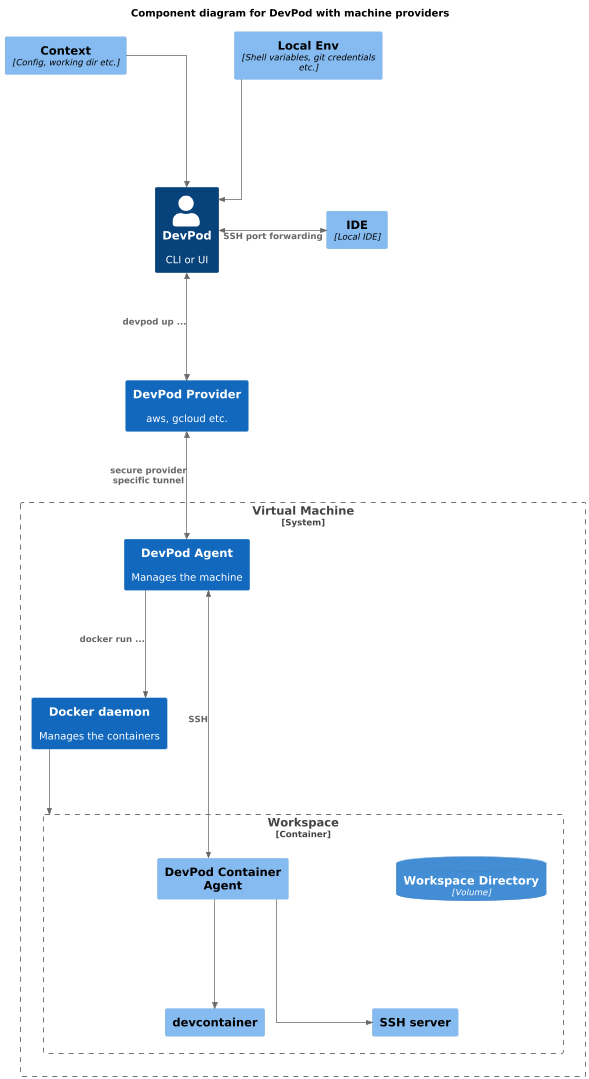
How it works using VMs
In Devsy, machines are the infrastructure that run your devcontainer. Providers like GCP, AWS, and DigitalOcean are considered "machine" providers because they first set up a virtual machine (VM) to host your container.
When you start a workspace with Devsy, such as running devsy workspace up, Devsy uses a selected provider and starts your devcontainer.
If the provider requires a virtual machine (VM), Devsy determines whether to create one. It uses your local environment's credentials and the corresponding CLI tool (e.g., aws for AWS or az for Azure) to set up the VM.
Once the VM is running, Devsy connects to it through the provider's secure tunnel. Below are examples of providers and their secure tunnels.
- AWS: Instance Connect
- Google Cloud (GCP): Cloud IAP (Identity-Aware Proxy)
- Azure: Azure Bastion
Alternatively, you can use SSH tunneling to connect to your machines, if supported by your setup.
The Devsy agent starts a SSH server using the STDIO of the secure tunnel in order for your local Devsy CLI/UI to forward ports over the SSH connection. Once this is done Devsy starts your local IDE and connects it to the devcontainer via SSH.